Friday, August 21, 2020

CORS Misconfigurations On A Large Scale

Inspired by James Kettle's great OWASP AppSec Europe talk on CORS misconfigurations, we decided to fiddle around with CORS security issues a bit. We were curious how many websites out there are actually vulnerable because of dynamically generated or misconfigured CORS headers.

The issue: CORS misconfiguration

Cross-Origin Resource Sharing (CORS) is a technique to punch holes into the Same-Origin Policy (SOP) – on purpose. It enables web servers to explicitly allow cross-site access to a certain resource by returning an Access-Control-Allow-Origin (ACAO) header. Sometimes, the value is even dynamically generated based on user-input such as the Origin header send by the browser. If misconfigured, an unintended website can access the resource. Furthermore, if the Access-Control-Allow-Credentials (ACAC) server header is set, an attacker can potentially leak sensitive information from a logged in user – which is almost as bad as XSS on the actual website. Below is a list of CORS misconfigurations which can potentially be exploited. For more technical details on the issues read the this fine blogpost.

Misconfiguation Description
Developer backdoorInsecure developer/debug origins like JSFiddler CodePen are allowed to access the resource
Origin reflectionThe origin is simply echoed in ACAO header, any site is allowed to access the resource
Null misconfigurationAny site is allowed access by forcing the null origin via a sandboxed iframe
Pre-domain wildcardnotdomain.com is allowed access, which can simply be registered by the attacker
Post-domain wildcarddomain.com.evil.com is allowed access, can be simply be set up by the attacker
Subdomains allowedsub.domain.com allowed access, exploitable if the attacker finds XSS in any subdomain
Non-SSL sites allowedAn HTTP origin is allowed access to a HTTPS resource, allows MitM to break encryption
Invalid CORS headerWrong use of wildcard or multiple origins,not a security problem but should be fixed

The tool: CORStest

Testing for such vulnerabilities can easily be done with curl(1). To support some more options like, for example, parallelization we wrote CORStest, a simple Python based CORS misconfiguration checker. It takes a text file containing a list of domain names or URLs to check for misconfigurations as input and supports some further options:

usage: corstest.py [arguments] infile

positional arguments:
infile File with domain or URL list

optional arguments:
-h, --help show this help message and exit
-c name=value Send cookie with all requests
-p processes multiprocessing (default: 32)
-s always force ssl/tls requests
-q quiet, allow-credentials only
-v produce a more verbose output

CORStest can detect potential vulnerabilities by sending various Origin request headers and checking for the Access-Control-Allow-Origin response. An example for those of the Alexa top 750 websites which allow credentials for CORS requests is given below.

Evaluation with Alexa top 1 Million websites

To evaluate – on a larger scale – how many sites actually have wide-open CORS configurations we did run CORStest on the Alexa top 1 million sites:

$ git clone https://github.com/RUB-NDS/CORStest.git && cd cors/
$ wget -q http://s3.amazonaws.com/alexa-static/top-1m.csv.zip
$ unzip top-1m.csv.zip
$ awk -F, '{print $2}' top-1m.csv > alexa.txt
$ ./corstest.py alexa.txt

This test took about 14 hours on a decent connection and revealed the following results:

Only 29,514 websites (about 3%) actually supported CORS on their main page (aka. responded with Access-Control-Allow-Origin). Of course, many sites such as Google do only enable CORS headers for certain resources, not directly on their landing page. We could have crawled all websites (including subdomains) and fed the input to CORStest. However, this would have taken a long time and for statistics, our quick & dirty approach should still be fine. Furthermore it must be noted that the test was only performed with GET requests (without any CORS preflight) to the http:// version of websites (with redirects followed). Note that just because a website, for example, reflects the origin header it is not necessarily vulnerable. The context matters; such a configuration can be totally fine for a public sites or API endpoints intended to be accessible by everyone. It can be disastrous for payment sites or social media platforms. Furthermore, to be actually exploitable the Access-Control-Allow-Credentials: true (ACAC) header must be set. Therefore we repeated the test, this time limited to sites that return this header (see CORStest -q flag):

$ ./corstest.py -q alexa.txt

This revealed even worse results - almost half of the websites supporting ACAO and ACAC headers contained a CORS misconfigurations that could be exploited directly by a web attacker (developer backdoor, origin reflection, null misconfig, pre-/post-domain wildcard):

The Impact: SOP/SSL bypass on payment and taxpayer sites

Note that not all tested websites actually were exploitable. Some contained only public data and some others - such as Bitbucket - had CORS enabled for their main page but not for subpages containing user data. Manually testing the sites, we found to be vulnerable:
  • A dozen of online banking, bitcoin and other payment sites; one of them allowed us to create a test account so we were able to write proof-of-concept code which could actually have been used to steal money
  • Hundred of online shops/e-commerce sites and a bunch of hotel/flight booking sites
  • Various social networks and misc sites which allow users to log in and communicate
  • One US state's tax filing website (however, this one was exploitable by a MitM only)
We informed all sites we manually tested and found to be vulnerable. A simple exploit code example when logged into a website with CORS origin reflection is given below.


The Reason: Copy & Paste and broken frameworks

We were further interested in reasons for CORS misconfigurations. Particularly we wanted to learn if there is a correlation between applied technology and misconfiguration. Therefore we used WhatWeb to fingerprint the web technologies for all vulnerable sites. CORS is usually enabled either directly in the HTTP server configuration or by the web application/framework. While we could not identify a single major cause for CORS misconfigurations, we found various potential reasons. A majority of dangerous Access-Control-* headers had probably been introduced by developers, others however are based on bugs and bad practices in some products. Insights follow:
  • Various websites return invalid CORS headers; besides wrong use of wildcards such as *.domain.com, ACAO headers which contain multiple origins can often be found; Other examples of invalid - but quite creative - ACAO values we observed are: self, true, false, undefined, None, 0, (null), domain, origin, SAMEORIGIN
  • Rack::Cors, the de facto standard library to enable CORS for Ruby on Rails maps origins '' or origins '*' into reflecting arbitrary origins; this is dangerous, because developers would think that '' allows nothing and '*' behaves according to the spec: mostly harmless because it cannot be used to make to make 'credentialed' requests; this config error leads to origin reflection with ACAC headers on about a hundred of the tested and vulnerable websites
  • A majority of websites which allow a http origin to CORS access a https resource are run on IIS; this seems to be no bug in IIS itself but rather caused by bad advises found on the Internet
  • nginx is the winner when it comes serving websites with origin reflections; again, this is not an issue of nginx but of dangerous configs copied from "Stackoverflow; same problem for Phusion Passenger
  • The null ACAO value may be based on programming languages that simply return null if no value is given (we haven't found any specific framework though); another explanation is that 'CORS in Action', a popular book on CORS, contains various examples with code such as var originWhitelist = ['null', ...], which could be misinterpreted by developers as safe
  • If CORS is enabled in the crVCL PHP Framework, it adds ACAC and ACAO headers for a configured domain. Unfortunatelly, it also introduces a post-domain and pre-subdomain wildcard vulnerability: sub.domain.com.evil.com
  • All sites that are based on "Solo Build It!" (scam?) respond with: Access-Control-Allow-Origin: http://sbiapps.sitesell.com
  • Some sites have :// or // as fixed ACAO values. How should browsers deal with this? Inconsistent at least! Firefox, Chrome, Safari and Opera allow arbitrary origins while IE and Edge deny all origins.
Continue reading
  1. Best Hacking Tools 2020
  2. Hacker Tools For Ios
  3. Blackhat Hacker Tools
  4. Game Hacking
  5. Nsa Hack Tools
  6. Nsa Hack Tools Download
  7. What Are Hacking Tools
  8. Hacker Tools
  9. Hacker Tools 2019
  10. Github Hacking Tools
  11. Pentest Tools Android
  12. Hack Tools Pc
  13. Hacker Tools Apk
  14. Hacking Tools For Kali Linux
  15. Physical Pentest Tools
  16. Pentest Tools Review
  17. Hacks And Tools
  18. Pentest Tools Subdomain
  19. Pentest Tools For Mac
  20. Hacking Tools For Kali Linux
  21. Pentest Tools Review
  22. Hacking Tools For Pc
  23. Hack Tools
  24. Hack Tools 2019
  25. Pentest Tools Linux
  26. World No 1 Hacker Software
  27. Pentest Tools
  28. Hacking Tools Windows 10
  29. Hacking Tools Mac
  30. Hack Tools Github
  31. Hack Tools Pc
  32. Hacker Tool Kit
  33. Pentest Tools For Ubuntu
  34. Wifi Hacker Tools For Windows
  35. Hack Tools
  36. How To Make Hacking Tools
  37. Pentest Tools Framework
  38. World No 1 Hacker Software
  39. Hacker Tools For Pc
  40. Install Pentest Tools Ubuntu
  41. Android Hack Tools Github
  42. Hacking Tools 2019
  43. Hack Tools
  44. Hack Apps
  45. Hacker Search Tools
  46. Hack Apps
  47. Pentest Tools Nmap
  48. Hack Tools
  49. Hack Apps
  50. Hack Tool Apk
  51. Termux Hacking Tools 2019
  52. Hacking Tools Kit
  53. Hacking Tools Mac
  54. Pentest Tools Url Fuzzer
  55. Physical Pentest Tools
  56. Hack Tools 2019
  57. Pentest Tools For Android
  58. Hacking Tools For Games
  59. Hack Tools Github
  60. Pentest Automation Tools
  61. Tools 4 Hack
  62. Computer Hacker
  63. Hack Website Online Tool
  64. Pentest Tools Website
  65. Bluetooth Hacking Tools Kali
  66. Best Hacking Tools 2019
  67. Hack App
  68. Free Pentest Tools For Windows
  69. Ethical Hacker Tools
  70. Pentest Tools Alternative
  71. Hackers Toolbox
  72. Hacking Tools Usb
  73. Best Hacking Tools 2020
  74. Pentest Reporting Tools
Thursday, August 20, 2020

15 Hidden Android Features You Should Know

While Android has matured by leaps and bounds, it's still going through the refinement phase. Over time, Google has both added and removed many popular features in Android. Sometimes the features are completely removed. However, in many cases, they make it to the Settings page or they are buried under different hidden places inside Android. That's why we have come up with this article where we unearth 15 hidden Android features that are quite interesting and helpful. So, let's go ahead and explore some unique Android features which are available on our Android devices.


Hidden Android Features

Here, we have mentioned several hidden Android features ranging from privacy, security, ease of use and more. Further, we have also added some obscure Android features which were released recently but might have gone under the radar. Now with that said, here are the hidden Android features that you should know and use often.

1. Block Spam Calls

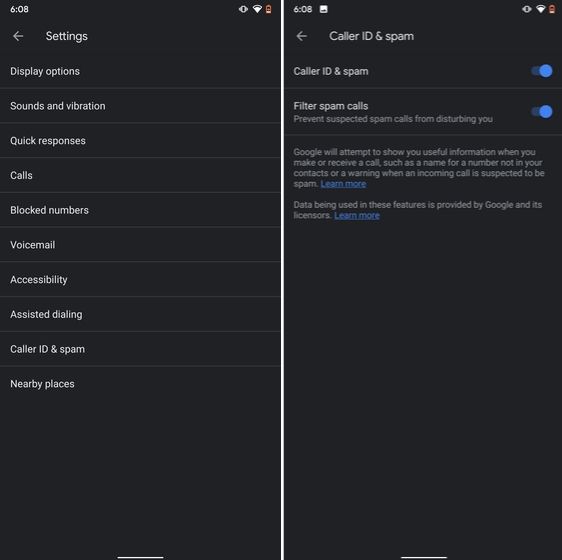
The one feature that I turn on whenever I set up a new Android device is: filter spam calls. It saves me from unwanted calls by telemarketers, fraudsters and spammers. If you use a stock Android device, you must have the Phone app by Google installed as your default dialer. To enable spam call blocking, open the Phone app and tap on the three-dot menu on the top-right corner and open Settings. After that, open "Caller ID and spam" and enable both the toggles. Now, whenever you will receive a call by spammers, the screen won't light up or make any sound. It's almost like DND with Total Silence turned on.

1. Block Spam Calls hidden android features

If you are worried that you will miss important calls then fret not. I have been using this feature for a long time and I can vouch that it works flawlessly. While there are other apps like Truecaller with similar features, you should be wary against handing your data to third-party apps, especially given its shady past record.

2. Verification Code Autofill

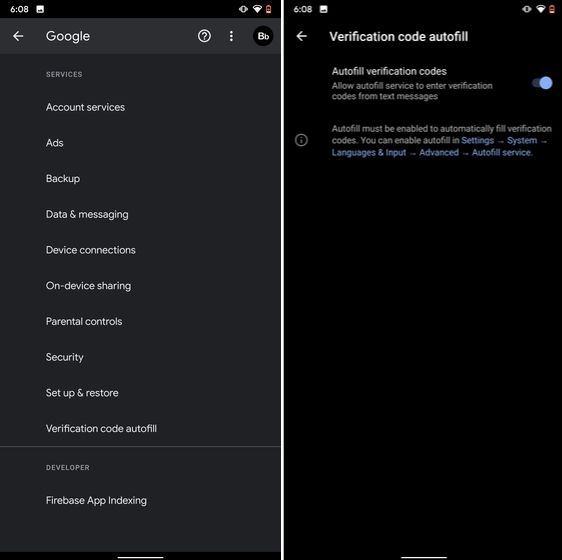
Many of us have allowed SMS permission to multiple apps for seamless OTP verification. However, this can lead to serious breach as apps can read all your text messages and also build credit profile without your consent. To crack down on this behavior, Google has brought a new API called the SMS Retriever. It allows apps to capture a one-time code without asking for SMS permission. In case, the app developer has not implemented this API, Google will act as a bridge and provide the verification code. That is awesome, right? So to enable this feature, navigate to Settings -> Google -> Verification Code Autofill and enable the toggle. Make sure you have also enabled the Autofill service by Google.

2. Verification Code Autofill

3. Force Dark Mode on all Apps

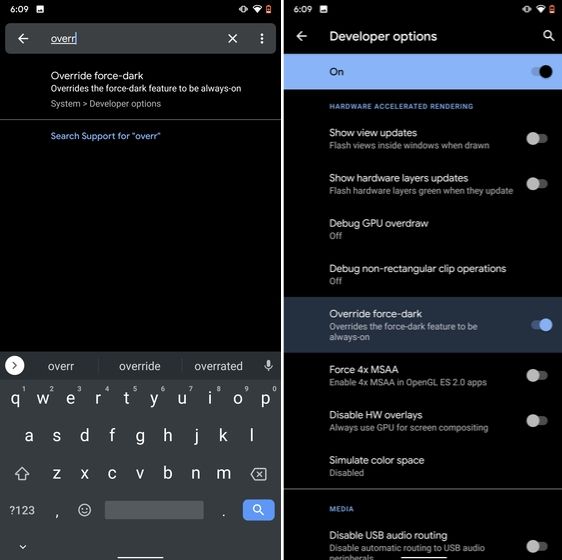
While the dark mode is slowly becoming the norm, there are still apps like Facebook and WhatsApp which are yet to embrace the dark side. If you want to force dark mode on a range of apps then there is a hidden Android setting that lets you do it. However, you must be on the latest Android 10 build. To enable dark mode for all the apps, navigate to Settings -> About Phone and tap on the Build Number for seven times continuously. A toast notification will show up prompting "Developer Options have been enabled". Now go back, and search for "Override force-dark" in the Settings page. Tap on the first result and then enable the toggle. Just to be sure, restart your device and check if dark mode is working on all apps.

3. Force Dark Mode on all Apps

4. Focus Mode

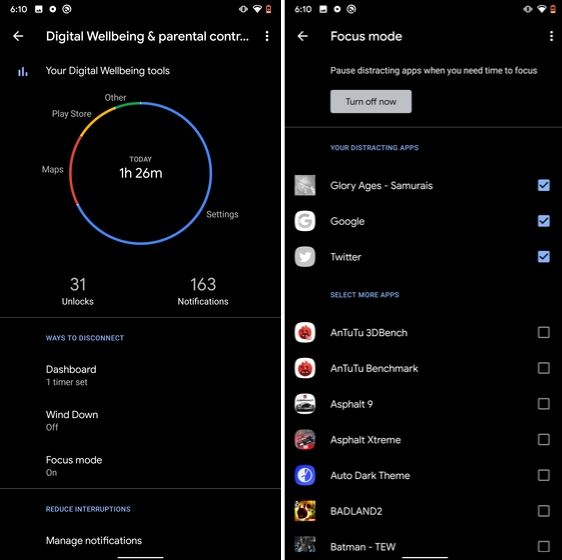
Google has brought a new feature called Focus Mode to Digital Wellbeing with the launch of Android 10. While Digital Wellbeing is great at limiting the screen time of various apps, Focus Mode allows you to block certain apps completely so you can focus on what you are doing. To configure Focus Mode, follow Settings -> Digital Wellbeing -> Focus Mode. Here, you can select apps that you find distracting and can enable Focus Mode straight from the Quick Settings panel.

4. Focus Mode hidden android features

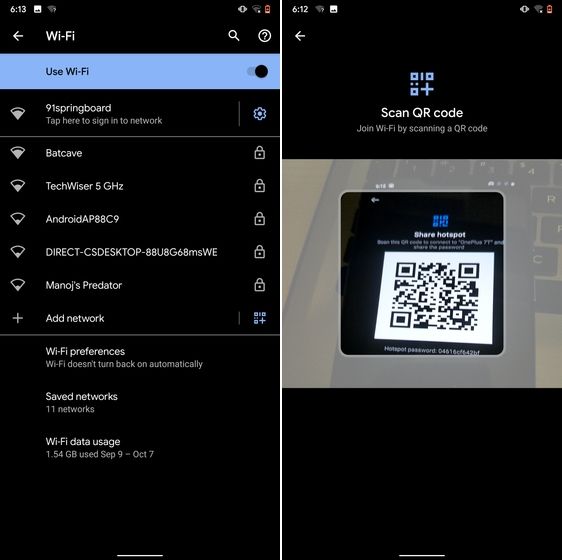
5. Share WiFi with QR Code

I know the feeling when someone asks you to share your WiFi's password and you can't seem to remember it. If you use a strong password with multiple hashes and characters then it becomes even more tedious to type it out. In such cases, a QR code can help you seamlessly connect to WiFi networks. Thankfully, Android 10 has this not-so-hidden feature under the WiFi Settings page. Open it and you will find the QR code scanner besides the "Add Network" section. Now, scan the QR code and you will be connected in no time.

5. Share WiFi with QR Code

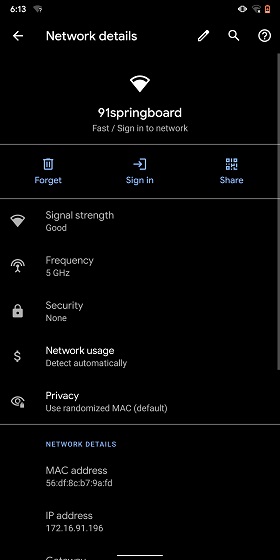
6. Randomize MAC Address

MAC address is a unique identifier assigned to WiFi-enabled devices including smartphones. Most devices come with a static MAC which can be exploited and used for tracking user movement. So having a random MAC address reduces the chance of tracking and strengthens your privacy. If you are running Android 10 then you can randomize the MAC address from the WiFi Settings page. Tap on the WiFi that you are connected to and open "Privacy". Here, make sure "Use randomized MAC" is your default pick.

6. Randomize MAC Address

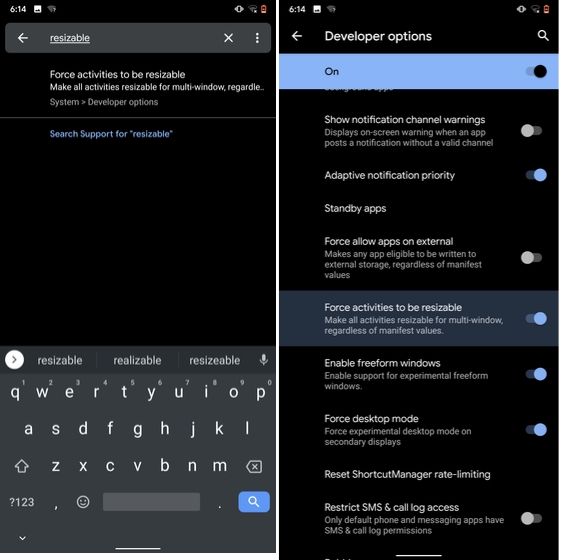
7. Force Apps to Resize in Split Mode

Android has some unique features like Split Mode which make it quite distinct from iOS. It lets you run two apps at once so you can effortlessly multitask between them. However, not all apps support Split Mode and that's where this hidden Android feature comes into play. With this feature, you can force any app to resize in split mode, irrespective of the app compatibility. So to enable this feature, open Settings and search for "resizable". Open the first result and enable "Force activities to be resizable". Now, restart your device and you can enjoy any app in the Split mode.

7. Force Apps to Resize in Split Mode

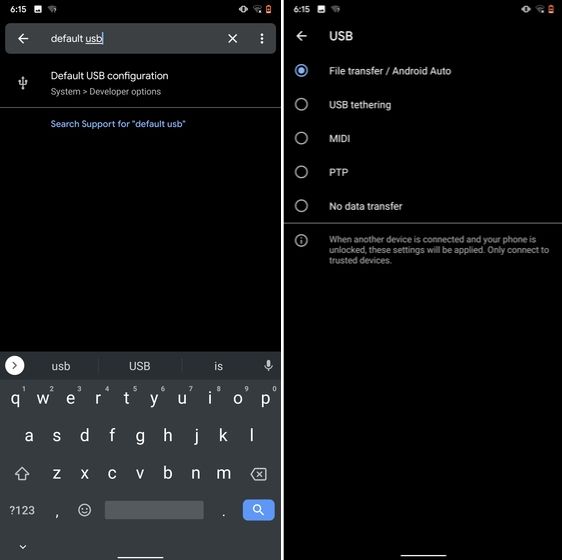
8. Default USB Configuration

If you are someone who regularly connects Android devices to PC then this sneaky feature is going to help you a lot. Android 10 now allows you to choose your default USB configuration. If you transfer files regularly then simply choose the desired settings and you are good to go. To configure USB, open Settings and search for "Default USB" and tap on the first result. Here, choose "File transfer" or any other settings based on your preference.

8. Default USB Configuration (2) hidden android features

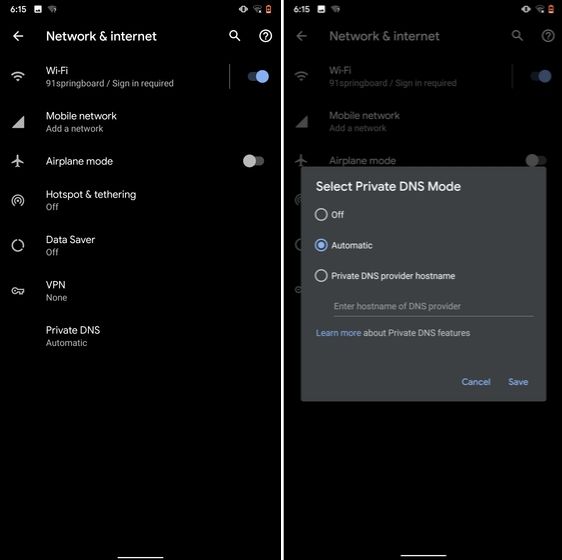
9. Private DNS

While Private DNS was launched with Android Pie, it still remains one of the least talked features of Android. It allows you to encrypt your DNS query so no one can read it, not even your internet service provider. You can find the Private DNS feature in the "Network and Internet" settings page. Here, open "Private DNS" and choose Automatic for Google's DNS or you can also select some other DNS providers as well. I would recommend you to go with Cloudflare's DNS.

9. Private DNS

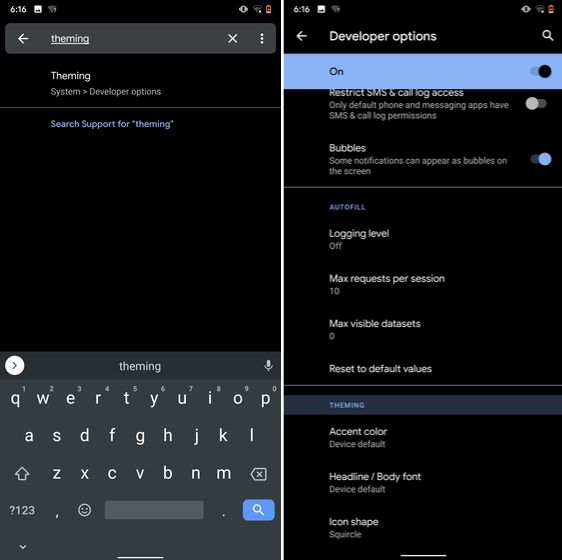
10. Device Theming

Device theming has finally arrived on Android, but it's still hidden under the developer options. You can change the accent color, font and icon shape from a handful of options. To find the desired settings page, open Settings and search for "theming". Tap on the top result and customize your Android device as you prefer.

10. Device Theming

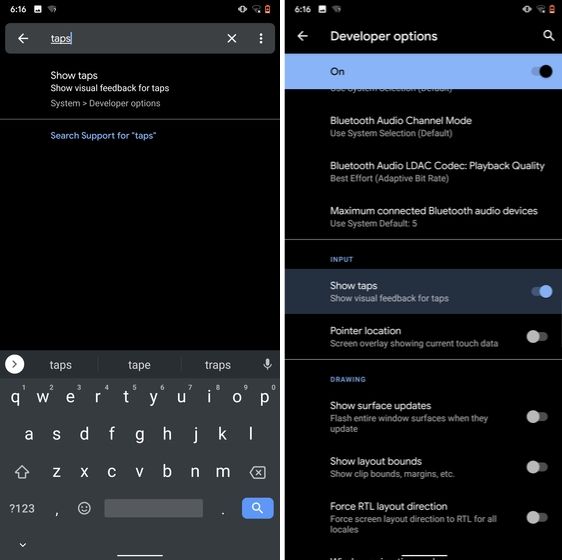
11. Show Taps While Screen Recording

With the release of Android Oreo, Google removed the ability to show taps while screen recording for security reasons. However, the settings to configure taps is still available and hidden under the developer options. Just open the Settings page and search for "taps". Open the first result and enable the toggle. Now, you can record your screen with taps and that's really convenient.

11. Show Taps While Screen Recording hidden android features

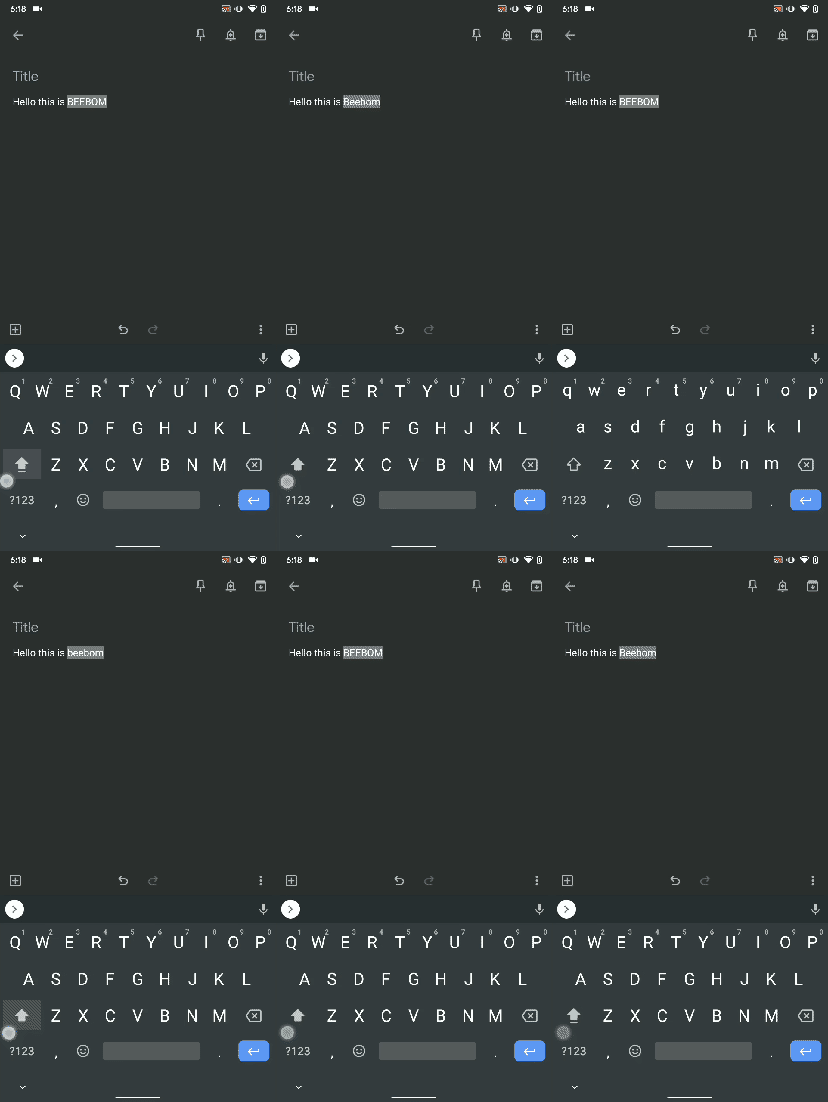
12. Capitalize Words Quickly

If you want to capitalize words quickly then Gboard has this nifty feature which is super helpful and I simply love it. Just select the words and tap the "Shift" button twice to capitalize a chunk of words at once. You can also make it lowercase by similarly double tapping the shift button. And if you just want to keep the initials capital then tap the shift button once. That's pretty great, right? So go ahead and type hassle-free with Gboard.

Capitalize Words Quickly

13. Uninstall Multiple Apps

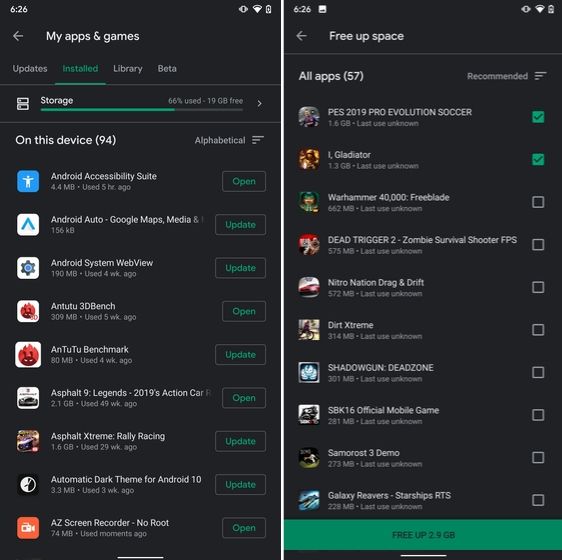
One of the best hidden Android features is that you can uninstall multiple apps at once. It works on older versions of Android as well so that is great. All you have to do is open the Google Play Store and tap on the hamburger menu and select "My apps and games". Here, switch to the "Installed" section and then tap on "Storage". After that, simply select apps that you want to uninstall and hit that "Free Up" button. Voila, multiple apps just got uninstalled in just one tap.

13. Uninstall Multiple Apps

14. Clear Site Storage Using Chrome

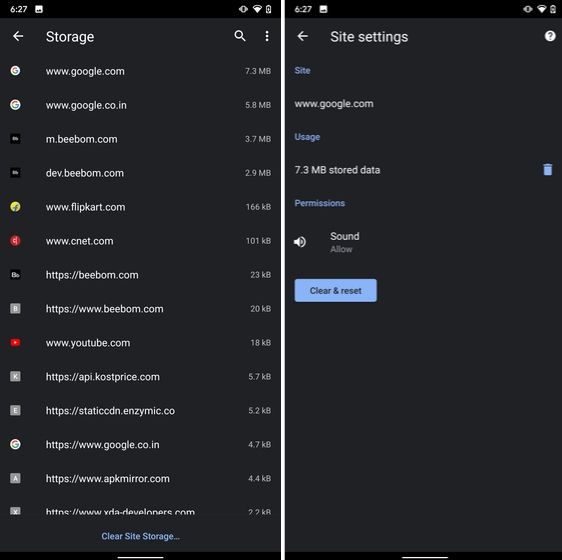
Chrome is notorious for accumulating a large amount of data in background which makes the performance worse and also takes up crucial storage space. If you want to check what websites are eating up your memory space then a hidden Chrome setting can help you with that. Open Chrome on your Android device and head over to its Settings page. Now, navigate to Site Settings and open Storage. Here, you will find all the websites with their storage space. Open any website and tap on the "Delete" icon to finally free up your internal storage from unnecessary cached data.

14. Clear Site Storage Using Chrome

15. Street View Layer in Google Maps

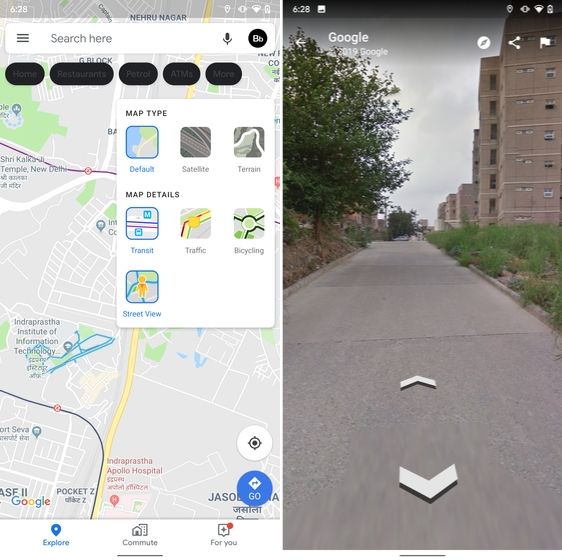
Street View is an immersive way to explore places and find new landmarks, hotels, restaurants from anywhere around the world. Now, the Street View Layer has been added to Google Maps and it works pretty well. To check if Street View is available in your region, open Google Maps and tap on the "layer" icon on the top-right corner. Now, tap on "Street View" icon and then zoom out to find blue lines on the map. Finally, tap on the blue lines and Street View will show up for that place. That's cool, right? So go ahead and check out Street View to find some hidden gems around the world.

15. Street View Layer in Google Maps hidden android features

Note: The blue lines show up wherever street view is available.

@EVERYTHING NT

Related articles
  1. Hacking Tools 2020
  2. Hacker Tools Apk
  3. Pentest Tools Tcp Port Scanner
  4. Hacking Tools 2020
  5. Hacker Tools For Windows
  6. Hacking Apps
  7. What Is Hacking Tools
  8. Pentest Tools Online
  9. Pentest Tools Website
  10. Hacking Tools Usb
  11. Hacker Tools Apk
  12. Hacking Tools Free Download
  13. Hacking Tools Windows 10
  14. Top Pentest Tools
  15. Game Hacking
  16. Pentest Tools Github
  17. Bluetooth Hacking Tools Kali
  18. Pentest Recon Tools
  19. Hacking Tools Software
  20. Tools Used For Hacking
  21. Pentest Tools Subdomain
  22. Hacking Tools Windows 10
  23. Hacking Tools Free Download
  24. Pentest Tools Android
  25. Hack Apps
  26. Hacker Tools Free
  27. Best Pentesting Tools 2018
  28. Hackrf Tools
  29. Wifi Hacker Tools For Windows
  30. Pentest Tools Port Scanner
  31. Pentest Tools Find Subdomains
  32. Physical Pentest Tools
  33. Install Pentest Tools Ubuntu
  34. Hacking Tools Windows
  35. Growth Hacker Tools
  36. Hacking Tools 2019
  37. Hacking Tools Free Download
  38. Pentest Tools Alternative
  39. Hacking Tools For Kali Linux
  40. Pentest Tools Subdomain
  41. Hacker Tools Online
  42. Hacking Apps
  43. Hack Tool Apk
  44. Hacking Tools 2020
  45. Hacker Tools 2019
  46. Pentest Tools Download
  47. Hacking Tools For Mac
  48. Hacking Tools Usb
  49. Beginner Hacker Tools
  50. World No 1 Hacker Software
  51. How To Install Pentest Tools In Ubuntu
  52. Pentest Tools Review
  53. Tools For Hacker
  54. Hacking Tools Mac
  55. Hack Tools For Mac
  56. Bluetooth Hacking Tools Kali
  57. Kik Hack Tools
  58. Growth Hacker Tools
  59. Ethical Hacker Tools
  60. Usb Pentest Tools
  61. Hacker Tools For Windows
  62. Pentest Tools Linux
  63. Hacker Tools 2019
  64. Hacker Search Tools
  65. Hack Tools For Games
  66. Tools Used For Hacking
  67. Android Hack Tools Github
  68. Pentest Tools Windows
  69. Hacker Tools Software
  70. Computer Hacker
  71. Hackers Toolbox
  72. Hack Tools For Ubuntu
  73. Hacker Security Tools
  74. Hacker Tools 2019
  75. Hacks And Tools
  76. Hacker Tools Github
  77. Pentest Tools Open Source
  78. Physical Pentest Tools
  79. Hacking Tools For Windows 7
  80. Pentest Tools Linux
  81. Pentest Tools For Mac
  82. Pentest Tools Website Vulnerability
  83. Hacking Tools Usb
  84. Beginner Hacker Tools
  85. Ethical Hacker Tools
  86. Hack Tools For Games
  87. Pentest Tools Find Subdomains
  88. Hack Tools Download
  89. Hack App
  90. Hacker Tools For Ios
  91. Pentest Tools For Mac
  92. Nsa Hacker Tools
  93. Hacks And Tools
  94. Hack Tools Mac
  95. Hack Tools For Windows
  96. Underground Hacker Sites
  97. Hacking Tools For Mac
  98. Pentest Tools List
  99. Hacking Tools Pc

Masad Clipper And Stealer - Windows Spyware Exfiltrating Data Via Telegram (Samples)


Reference


"Masad Clipper and Stealer" steals browser information, computer files,  and automatically replaces cryptocurrency wallets from the clipboard with its own.
It is written using Autoit scripts and then compiled into a Windows executable.
It uses Telegram to exfiltrate stolen information.


Download

             Other malware


Hashes

SHA256SHA1MD5
1acf5a461ee16336eb8bbf8d29982c7e26d5e11827c58ca01adac671a28b52ad6001b34c17c122d201613fffd846b056614b66dae03234c2259c474aeb69500423ddeed7
290a1b89517dec10bfd9938a0e86ae8c53b0c78ed7c60dc99e4f8e5837f4f24a32800c10588053813f55bf8c87771311c5f7f38e2df4c1cf093c8373a8f2f194e77b69a2
7937a1068f130a90b44781eea3351ba8a2776d0fede9699ba8b32f3198de045ba2a67b06344e4f1cf85086f6b584316ec53d5e548368f1c4d8f0d908f5f4ff671df5f1da
87e44bca3cc360c64cc7449ec1dc26b7d1708441d471bf3d36cd330db35762942fe5483e6b82220eeeef12e531eb3347fea16ac11082ce517dd23eee335bedfc6bcd8205
cf97d52551a96dacb089ac41463d21cab2b004ba8c38ffc6cb5fb0958ddd34db5b79a15cb61f5260f0b9d807faa160e6d49590e4b5fdf9653eb1ffbdae8cb4f1f2d71747
79aa23c5a25c7cdbaba9c6c655c918dac3d9823ac62ebed9d7d3e94e1eaafc074a279a6b82fe801d3c8be9d16df2ef5623b177040029ab0fd56cd7e493b46a331ef18bd3
03d703f6d341be258ac3d95961ff0a67d4bf792f9e896530e193b091dca29c2ea9740352af2c9cc926deba7dffc452f213f7f05fa462aac76def5b53351b3b1ddb41124c
a368b6755e62e5c0ff79ea1e3bd146ee8a349af309b4acf0558a9c667e78293ae16167ab646381c277c2ca84319ceb57bacb2c92c4cdc7665adb1cda5897d4df4a560f88
ba933cefbe9a8034f0ba34e7d18481a7db7451c8ef4b6172fb0cad6db0513a5100749407e97085af470c75ef004f2235d30af44fc26a3f2317507a09d91014469b045384
3ba3c528d11d1df62a969a282e9e54534fb3845962672ad6d8bbc29cb6d062f5b8100890c0f1894544b3f99168377ec46c38e9114a0607b4488cd539b8b0b443abd121e3
b763054180cd4e24c0a78b49055ad36dbc849f1a096cddf2db8cee0b9338c21d7bec99308ce4bf409417b642cd9432000a5c19d22dfb1d606e5539399aa1a536baafd2f8
d5ce4b04b7eec6530a4a9d40510177468fadc235253e5a74530a8c9d990f3c5027fc204ffa42262b7570b6fccb435d4d38a3610fc5d8b73da810646407c333fe52186281
965a5949d8f94e17ebcd4cb6d0a7c19f49facbfc1b1c74111e5ceb83550d6c8f7698584b2e7c62061447a6a2583ed6957180c205e7ebe4411664672359b393f530fc2fc1
44134b9d4b10d94f6381b446a1728b116d62e65c1a52db45235af12caf7e38c0fd114077927d501606575ba9ab38ecfb3407d432a4388980d7e3539d74a950dab23d00ac
848d76a227f4fe282b7ddfd82a6dfc4c25da2735a684462b42fe4e1c413d8e34135cee7610890497183eb6251efef307ea013fe17bb23077b4f80df48b91b425eda05828
5ca0a957fe6c253827f344da4ba8692d77a4e21a1df4251594be2d27d87dd8aed231874332ca462fb462e4f68450d2c2c22d4bcddda77b3f3f74a2bdffd167917686e139
016fa511f6546ed439d2606c6db8821685a99f5a14ef3f710668b58dc89c69265c83749c62ee0131710bf26931cb1e463a8fbda3b0c34df85677d8f752dc1e1a5eeba0c9
22be594fbfa878f631c0632f6c4d260b00918817ff66a1f9f15efe44c1a58460856d635fca52631305f1fefc58eafa74496524b660ebf41953d5c6e212fc306cdb0c6519
f3571ec66288405dab43332ca03812617f85fb08832fbbe1f1d89901fe034b8a819485e20d841195e2e8a7ae5b41ff709887bb216984d37863c08b9fdd969297d35d3538
04c949eca23103b1de05278b49f42c3ab6b06f4bf20aafa5f2faefaa84c16ecd0487db2df1802dd4ee4ae3b62b5f08937dd5c77c4366ee61cbd7e636aea8540836a60036
d6fc04acda8f33a6d35eb577c27754c2f2b4d6f4869576c7c4e11b2c5e9b017683ae89826114662dad8553d5eeed5217b57047f22bc964e294d7ab314c34e5934d91a5a9
18c0bd4dd98008383fc52045ad896449fa7f0037593bb730ed1ef88aa547006dbcaa05b60a9d625852ac4f2d0d805ab16498815535d9f08c39c4cf396427f3a345e5c09a
4c9d5469e9095813418260045c2b11e499e4eaa0ffb25293f90f580c464157df4c6aacc0b893ed366f9f307326e59efa61e5153450dddaf7e5bb24aabf66eecd0c8b79cf
0b5f1fbc05dc8baca492b748adeb01fb4904e02723b59211ecde222f7b12d91e87f898e0d41c0f2c22d4e9278a942326877fc368da780b72140535d4c2d391e76dc8181d
31ad5c4547ceae4d0550c8460524c16a6105afc056760e872c4966656256c9dc37f485d3fa8f6cf13061cb1ea38ae0d5d2edfd95134aefcf640c24a1ab5344a96150fb05
edb00a0e5ff70e899857549e3263c887a799416c8bbab43ab130ca1be9bbd78c42c30dc551a3cb3bc935c0eae79b79f17942e439c2722241f765d2ad4fb58edd76a4adea
96f852b81760a425befaa11ea37c0cdea2622630bf2a0c94bb95042211ab614d5d9782064bc38d40c88f32c0410479cbd61caa40f332cfcda8c0ef579ede59eff23caa1e
57fd171a5b1a88e9583b42439851a91a940eb31105ab29cb314846da2ed43b820bfec2059823b936d782bea7bc16abd9923dddb56fff82df7a565b4570d299486697310f
277018b2cc6226dca6c7678cac6718c8584f7231340ad8cd7c03477559fdf48b261f916ce97ffc6817a4772705df68e6ccca8181009dc7d8766a85d85bb6a26ee69b66fe
e968affb1fc7756deb0e29807a06681d09a0425990be76b31816795875469e3dcf78484a999183324da9affdf2aaeff508d1dc473e1b8f6313447b8a4b49671ddeb8a4ee
4b1ccf6b823ee82e400ba25b1f532cd369d7e536475a470e2011b77ffeaf7bb3bc988f7cd32d411f2a9888afc72c7a892e2a1def55128a3da6f70129acdbf9dbe955cfe7
fc84d6636a34ad1a11dbaa1daec179e426bdcd9887b3d26dc06b202417c08f951df31bec02e35c9a4656bb3a3bdf631bb37605a855d77ab16377a8a314982f723fcc6fae
9ca15f15fbae58cb97b0d48a0248461e78e34e6d530338e3e5b91f209a1662678505dfaad6d10b84c73544eb748d547cb5bad9bdebc12c530dab0a65c37ffd72612fa705
31f3a402c1662ed6adffbf2b1b65cf902d1df763698eb76d21e4e94b4c62971418c972722d984ff6da2bc26a0aca4c7f209cc39c05bbf6e72b5b24c0c81e0671bf17b1e7
8d9f124ddd69c257189f1e814bb9e3731c00926fc2371e6ebe2654f3950ca02e553cd98c83e945ee3013aa40897baec0305b34a2b4030025e039c54c2d3923057447494c
a0923d7645604faaa864a079adeb741a5d6e65507a2819b2fee4835d396077d9f8e6995e28c789d8b24e982ac53d5d6ba453de73b796f85c8a7de71407d6e3c4206edda3
a19b790ea12f785256510dde367d3313b5267536a58ca0c27dbdac7c693f57e1a92f7393daf7ead9a44b12e35f850705798fc879a6defec886d31f6375712466dd794a96
f030fb4e859ee6a97c50c973a73dced3640befe37f579cfd15367ce6a9bbede2ad3a1e779f02539ccd07bff735e0823add9730b2c259564a8fe72333604a5686e30f6242
f01db6d77ac21211992ceae4e66e1e03c1cb39d61e03645b9369f28252ca769314c6bf63ff4d32d8a0a42e81ea39304fb7ab13c880fe593ef5538fbf66b3b3e1cb7b9b8b
dfe3d0e95feaed685a784aed14d087b019ba2eb0274947a840d2bdbae4ae36742107d057478328df8f538102508de00b0c4b37c7b5a85a0e7a2c4197c3794c8bb2eb5763
bf6083040ca51e83415f27c9412d9e3d700bd0841493b207bc96abf944ab0ca709a695ce6c35c029dd7577e29f403d7144698b417a2edceb31a9c0d05e5f13c6caee0576
b154151dc8ace5c57f109e6bb211a019db20c4f0127c4d13c7703f730bf492768c0cda049c85493df4e97db3db4ddc94075ba62cb6a895ac5ba5b6472680d47410a238a5
6bf6b1bde63cee9b81902efd187fdd56ecee5853754ce0a19d5ab5c3b02429886e2d4f0bcc97ce130ae89647f648d3e96548a391a29f9d176b913e7f693355700aaadbb9
0dcf547bd8f4074af97416d8b84ea64b2f3319064aa4bce64ad0c2e2d3957175a996b925e9391a69140caf6e4adba928694ffe66dd575413a40839f2807593aa21c71152
6cff1249cc45b61ce8d28d87f8edc6616447e38168e610bed142f0b9c46ea6849baa823deb9075e8df77b891115c019244de09de488bb5c0739485721182c01a82b01d14
5b5ebe019806885bbaafe37bc10ca09549e41c240b793fd29a70690a5d80b4963d46711f9064b96ff2d0affdef1ecd82d120659db95e2d8a8509ac05f5445d18d32cc7cb
103d87098c9702cab7454b52869aeeb6a22919f29a7f19be7509255ce2d8c83ee29a163488438c9ea9014ddf1a9b2d382cc5d7e6baf2587fafaedbab4a78b9b7fd8b55f8
c73675005a09008bc91d6bc3b5ad59a630ab4670dca6ac0d926165a3ecfd8d92d8ea2280cd06a5cc32b7d668e2b4b2e68f3a7e2a98ecc6fbb2cb5649daf751fcbfb81bcb
ef623aadd50330342dc464a31b843b3d8b5767d62a62f5e515ac2b380b208fbe620ff5a7aaf7f3fcf4abc9365e0e77b3ec4b434db14535c5835c9dfb3cbbc7f6fef6034c
More info

Monday, July 13, 2020

Top 8 Websites to Learn How to Hack Like a Pro

  1. Hacked Gadgets: A resource for DIY project documentation as well as general gadget and technology news.
  2. Exploit DB: An archive of exploits and vulnerable software by Offensive Security. The site collects exploits from submissions and mailing lists and concentrates them in a single database.
  3. KitPloit: Leading source of Security Tools, Hacking Tools, CyberSecurity and Network Security.
  4. HackRead: HackRead is a News Platform that centers on InfoSec, Cyber Crime, Privacy, Surveillance, and Hacking News with full-scale reviews on Social Media Platforms.
  5. Phrack Magazine: Digital hacking magazine.
  6. Packet Storm: Information Security Services, News, Files, Tools, Exploits, Advisories and Whitepapers.
  7. Metasploit: Find security issues, verify vulnerability mitigations & manage security assessments with Metasploit. Get the worlds best penetration testing software now.
  8. The Hacker News: The Hacker News — most trusted and widely-acknowledged online cyber security news magazine with in-depth technical coverage for cybersecurity.

Wednesday, January 22, 2020

Re: Quota


Your Mailbox has exceeded the Quota set by the Mail Team.

You may not be able to send or receive new email until you re-enable your web mail.

For verification , Click here to restore access your email.


Thanks!
Information Technology